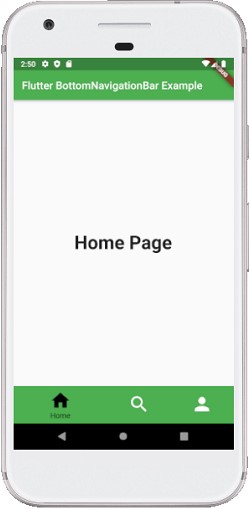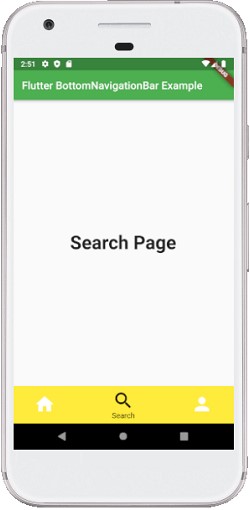
Bottom Navigation Bar
A BottomNavigationBar widget can be displayed at the bottom of the app to select among the small number of views.
A bottom navigation bar which is basically used in the Scaffold Widget, that’s why it is provided as the Scaffold.bottom navigation bar argument.
import 'package:flutter/material.dart';

void main() => runApp(MyApp());

/// This Widget is the main application widget.
class MyApp extends StatelessWidget {
  @override
  Widget build(BuildContext context) {
    return MaterialApp(
      home: MyNavigationBar (),
    );
  }
}

class MyNavigationBar extends StatefulWidget {
  MyNavigationBar ({Key key}) : super(key: key);

  @override
  _MyNavigationBarState createState() => _MyNavigationBarState();
}

class _MyNavigationBarState extends State {
  int _selectedIndex = 0;
  static const List _widgetOptions = [
    Text('Home Page', style: TextStyle(fontSize: 35, fontWeight: FontWeight.bold)),
    Text('Search Page', style: TextStyle(fontSize: 35, fontWeight: FontWeight.bold)),
    Text('Profile Page', style: TextStyle(fontSize: 35, fontWeight: FontWeight.bold)),
  ];

  void _onItemTapped(int index) {
    setState(() {
      _selectedIndex = index;
    });
  }

  @override
  Widget build(BuildContext context) {
    return Scaffold(
      appBar: AppBar(
        title: const Text('Flutter BottomNavigationBar Example'),
          backgroundColor: Colors.green
      ),
      body: Center(
        child: _widgetOptions.elementAt(_selectedIndex),
      ),
      bottomNavigationBar: BottomNavigationBar(
        items: const [
          BottomNavigationBarItem(
            icon: Icon(Icons.home),
            title: Text('Home'),
            backgroundColor: Colors.green
          ),
          BottomNavigationBarItem(
            icon: Icon(Icons.search),
            title: Text('Search'),
            backgroundColor: Colors.yellow
          ),
          BottomNavigationBarItem(
            icon: Icon(Icons.person),
            title: Text('Profile'),
            backgroundColor: Colors.blue,
          ),
        ],
        type: BottomNavigationBarType.shifting,
        currentIndex: _selectedIndex,
        selectedItemColor: Colors.black,
        iconSize: 40,
        onTap: _onItemTapped,
        elevation: 5
      ),
    );
  }
}
Example