Flutter Checkbox
A checkbox is an input component which is used for holding the Boolean value. There are two widget which can be used for checkbox a CheckBox widget and a CheckBoxTile widget
Checkbox:
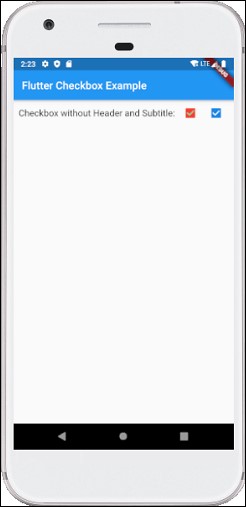
CheckBox widget is used as the checkbox you can put it anyhow Let see an example:
import 'package:flutter/material.dart';

void main() {
  runApp(MaterialApp( home: MyHomePage(),));
}

class MyHomePage extends StatefulWidget {
  @override
  _HomePageState createState() => _HomePageState();
}

class _HomePageState extends State {
  bool valuefirst = false;
  bool valuesecond = false;

  @override
  Widget build(BuildContext context) {
    return MaterialApp(
      home: Scaffold(
        appBar: AppBar(title: Text('Flutter Checkbox Example'),),
        body: Container(

            child: Column(
              children: [
                Row(
                  children: [
                    SizedBox(width: 10,),
                    Text('Checkbox without Header and Subtitle: ',style: TextStyle(fontSize: 17.0), ),
                    Checkbox(
                      checkColor: Colors.greenAccent,
                      activeColor: Colors.red,
                      value: this.valuefirst,
                      onChanged: (bool value) {
                        setState(() {
                          this.valuefirst = value;
                        });
                      },
                    ),
                    Checkbox(
                      value: this.valuesecond,
                      onChanged: (bool value) {
                        setState(() {
                          this.valuesecond = value;
                        });
                      },
                    ),
                  ],
                ),
              ],
            )
        ),
      ),
    );
  }
}
Output
CheckboxListTitle:
| Attributes | Descriptions |
|---|---|
| value | Used to check whether the checkbox is checked or not. |
| onChanged | Method we can pass to get the value of the box. |
| titile | Title of the tile. |
| subtitle | Subtitle of the tile. |
| activeColor | Active color of the selected checkbox. |
| selected | By default, it is false, But you can change it to true. It highlights the text after selection. |
| secondary | It is the widget, which we display in front of the checkbox. |
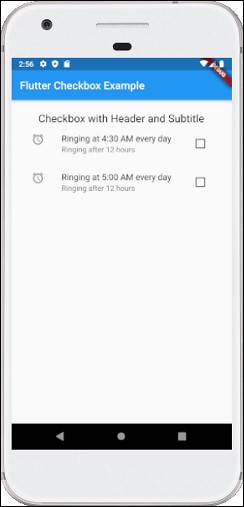
Example
import 'package:flutter/material.dart';

void main() {
  runApp(MaterialApp( home: MyHomePage(),));
}

class MyHomePage extends StatefulWidget {
  @override
  _HomePageState createState() => _HomePageState();
}

class _HomePageState extends State {
  bool valuefirst = false;
  bool valuesecond = false;

  @override
  Widget build(BuildContext context) {
    return MaterialApp(
      home: Scaffold(
        appBar: AppBar(title: Text('Flutter Checkbox Example'),),
        body: Container(
            padding: new EdgeInsets.all(22.0),
            child: Column(
              children: [
                SizedBox(width: 10,),
                Text('Checkbox with Header and Subtitle',
             style: TextStyle(fontSize: 20.0), ),
                CheckboxListTile(
                  secondary: const Icon(Icons.alarm),
                  title: Text('Ringing at 4:30 AM every day'),
                  subtitle: Text('Ringing after 12 hours'),
                  value: this.valuefirst,
                  onChanged: (bool value) {
                    setState(() {
                      this.valuefirst = value;
                    });
                  },
                ),
                CheckboxListTile(
                  controlAffinity: ListTileControlAffinity.trailing,
                  secondary: const Icon(Icons.alarm),
                  title: const Text('Ringing at 5:00 AM every day'),
                  subtitle: Text('Ringing after 12 hours'),
                  value: this.valuesecond,
                  onChanged: (bool value) {
                    setState(() {
                      this.valuesecond = value;
                    });
                  },
                ),
              ],
            )
        ),
      ),
    );
  }
}
Output